



Imagine managing numerous office sites, cloud systems, and business applications, and having to track down a network address that has changed every time a system needs to connect. Such change can disrupt communication, complicate remote access, and create more work for your IT team.
A static IP address provides a consistent point of contact. Because it isn’t automatically changed, it’s simpler to set up network services, create connections, and manage access control across various environments.
This consistency can be significant for businesses that depend on secure communication across offices, data centers, and cloud networks.
But what is a static IP address, and how does it work? Let’s explore its role in modern business networking.
What Is a Static IP Address?

A static IP address is a numeric address assigned to a computer or network connection that does not change unless an administrator or service provider alters it. It also provides a fixed identity that other systems can use to find and connect to the same endpoint, compared to a dynamic IP address, which may change over time.
When a business links to two or more office locations, it can be easier to use the same network endpoint, allowing communication between distinct environments. When configuring an IPsec site-to-site VPN, for example, a static IP address can provide a predictable public endpoint for one gateway to reach another. This makes it easier to configure a tunnel because the administrator does not have to account for a changing endpoint address.
A fixed address, however, is not always a connection. It provides uniformity, and the data passing through the network is encrypted, authenticated, and access-controlled.
Static IP vs. Dynamic IP
The key distinction between static and dynamic IP addresses is how they are assigned and maintained.
- Static IP address: It does not change until somebody changes its settings. Administrators can use it to create services that other networks or devices must access at all times.
- Dynamic IP address: It is typically configured automatically by the Dynamic Host Configuration Protocol (DHCP). The address can vary when a lease expires, a device reconnects, or network settings change. Dynamic addresses are suitable for day-to-day internet use, as they minimize manual configuration. Nonetheless, address changes may require extra procedures when a business needs to maintain connections between distinct networks.
Public and Private Static IP Addresses
A static IP address can be public or private, depending on where it operates.
An internet-facing connection is assigned to a public static IP address. External systems can use it to access an authorized endpoint in a network, but this is subject to firewall rules and other security measures. Businesses can use one for hosting services, setting up remote access, or creating connections with outside networks.
The private static IP address is used in an internal network. It helps identify equipment like printers, network equipment, and servers. For example, an organization can assign a private address that always stays the same to an internal server, enabling employees and approved applications to access it without monitoring address changes.
Both are used to facilitate predictable communication, but they serve different purposes. Your network design determines which one you need.
How Does It Work?
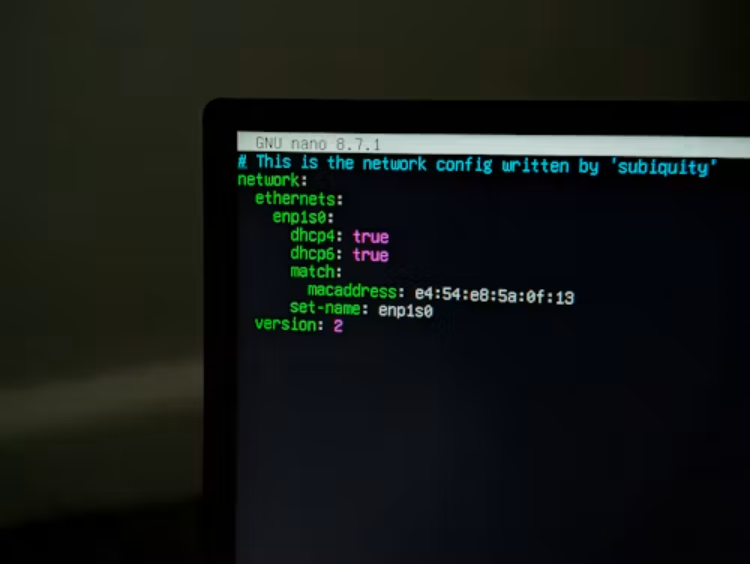
A static IP address works by keeping the same address assigned to a particular device or network interface. Rather than using an automatically varying allocation, the network administrator or internet service provider allocates the address and reserves it or configures it to remain in use.
The process involves several steps.
1. Address Assignment
Originally, an administrator or service provider allocates a free IP address to the device or connection that is needed. This may involve configuring the address directly or creating a DHCP reservation that consistently assigns the same address to a device.
The administrator should also set the right subnet mask, default gateway, and DNS. This information helps the machine recognize its immediate network, interact with other networks, and resolve domain names.
2. Network Identification
Once configured, the device uses the assigned address whenever it communicates on the network. Other systems can identify the same endpoint using the same address, making communication predictable.
For example, a business server with a fixed private IP can be accessible to authorized office systems using standard network configurations. Likewise, a gateway facing the internet may offer another network a known destination to contact.
3. Secure Connection Establishment
The network then utilizes the assigned address to communicate with another device or endpoint. This is especially handy when you are associating different business sites via an IPsec site-to-site VPN.
With IPsec gateways, unlike individual VPN applications, encrypted connections are established between whole networks. This means each gateway can communicate through the tunnel without installing VPNs on each machine.
All gateways are the connection points between their local network and the external world. Standards-based IKEv2/IPsec establishes the tunnel, and the data passing through it is secured by encryption. A stable public endpoint also makes it easier to configure the gateway, since each end has a known address to reach.
4. Traffic Routing
Once the tunnel is established, administrators determine which subnets are allowed to use the tunnel. For example, a headquarters network might need to connect to a branch office server, while the rest of the traffic flows on its regular internet path.
Special subnetting and routing policies help steer traffic toward the desired destination. They also enable businesses to manage the availability of resources across interconnected locations.
The technique comes in handy when connecting office systems, data centers, and cloud systems. Companies can create their own tunnels to services like AWS, Microsoft Azure, and Google Cloud without treating each connected device as an independent VPN endpoint.
5. Monitoring And Maintenance
After the connection is in operation, administrators are responsible for keeping track of its status and configuration. The management dashboard can consolidate the status of gateways and tunnels, network events, and alerts in one place. This provides your IT team with a better understanding of the relationships between various locations and helps identify problems that need to be addressed.
Security management is also significant. Administrators can use pre-shared keys (PSKs) or digital certificates to authenticate IPsec connections. AES-256-GCM and Perfect Forward Secrecy (PFS) are also encryption options that facilitate secure communication.
Businesses can keep control of their authentication credentials rather than giving them to a third-party gateway operator. Moreover, integration with existing equipment, such as pfSense, OPNsense, Cisco, Fortinet, and MikroTik, may be easy.
These abilities make static addressing helpful in a larger network configuration, though the address is only one part of the configuration. Proper authentication, encryption, routing, and monitoring are all necessary for dependable connections.
Conclusion
A static IP address provides your device or network connection with a constant identity, making it easier to maintain services and enable predictable communication. For businesses, this can simplify connections between offices, data centers, partner networks, and cloud platforms.
A stable address, however, does not secure network traffic. You must also have proper encryption, authentication, routing, and access controls. With regular, standards-based IPsec gateways, you can bridge different networks and ensure security while maintaining control over the flow of business information across networks.